¶ Setting a Custom SSH Login Banner and MOTD in Linux
SSH (Secure Shell) is a protocol used for remote access to Linux systems. One way to enhance security and provide information to users is by setting a custom SSH warning banner and Message of the Day (MOTD). In this guide, we'll show you how to do this on a Linux system.
¶ Step 1: Create the SSH Banner File
- Open a terminal and create a custom SSH warning banner file. Typically, this file is named
bannerand located in the/etc/ssh/directory.
sudo vim /etc/ssh/banner
- Add your custom banner text to the file. Here's an example:
******************************* WARNING ***********************************
Welcome to the [Company Name] Secure Shell. Unauthorized access is strictly
prohibited and will result in immediate disciplinary action. All activity is
monitored and recorded. Unauthorized access will be investigated and punished
to the fullest extent of the law.

By accessing this system, you acknowledge that all data stored and processed
here is confidential and should not be disclosed to unauthorized parties.

If you are not an authorized person, please log out immediately from the system.
****************************************************************************
¶ Step 2: Configure the SSH Daemon
- Open the SSH daemon configuration file for editing:
sudo vim /etc/ssh/sshd_config
- Locate the line that starts with "Banner" and uncomment it by removing the
#symbol. Add the path to the banner file:
Banner /etc/ssh/banner
¶ Step 3: Create the MOTD File
- Create a custom MOTD (Message of the Day) file. Typically, this file is named
motdand located in the/etc/directory:
sudo vim /etc/motd
- Add your custom MOTD text to the file. For example:
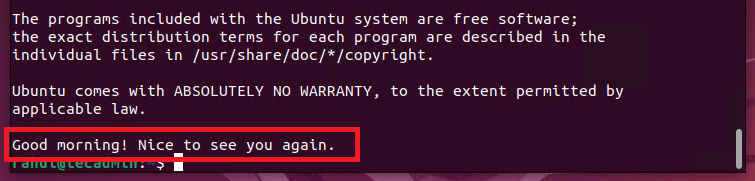
Good morning! Nice to see you again.
¶ Step 4: Restart the SSH Daemon
- Restart the SSH daemon to apply the changes:
sudo systemctl restart ssh
¶ Step 5: Verify Setup
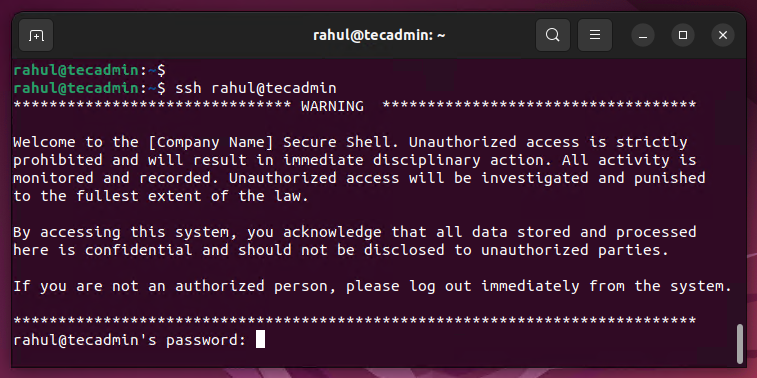
- Log in to your system via SSH. Before entering your credentials, you will see the custom SSH warning banner. After successful authentication, the MOTD message will be displayed.
Banner message:
Message of the Day (MOTD):
¶ Conclusion
By following these steps, you can easily set a custom SSH warning banner and MOTD in Linux. This helps improve security and provides important information to users when they log in via SSH. Ensure that users are aware of any security policies or warnings before accessing the system.